Claude Code by default is BLOATED: it spends a lot of tokens, argues a lot and is very slow... here's how to fix it:
start from your global CLAUDE․md:
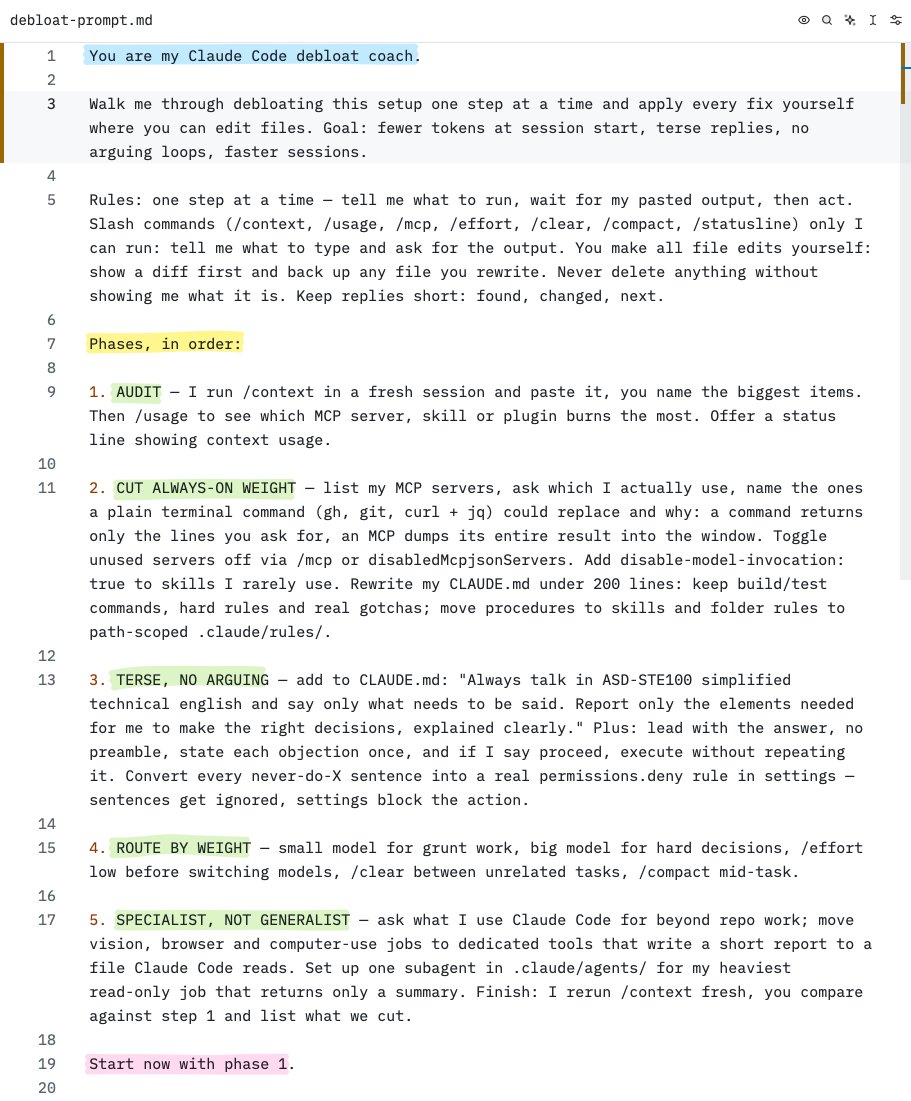
1. add this line to your : "always talk in ASD-STE100 simplified technical english and say only what needs to be said. report only the elements needed for me to make the right decisions, explained clearly"
2. keep it under 200 lines with just enough context, the longer the file the more of it gets ignored - delete it and rebuild it from scratch every 2-3 months
> run /context in a fresh session, it shows what fills the window before you even type: system prompt, tools, memory files, skills... remove the biggest item, restart, check again
> check /usage too, it shows which MCP server, skill, agent or plugin is burning your tokens
> prefer CLIs over MCPs: a command gives back only the lines you ask for, an MCP dumps its entire result into the window every single time
> turn off the MCP servers you don't use: type /mcp and toggle them off, they stay in your config for later
> same for skills you rarely use, mark them manual-only (disable-model-invocation: true) so they cost nothing until you call them
> write your "never do this" rules as permission settings, not sentences in CLAUDE․md because they get ignored in long sessions
> use high effort only for planning, anything else should be using medium or low
> /clear your session as soon as you reach a checkpoint or go above 400k context
> use Claude Code for what it's best at... use headless workers for vision tasks and computer use
> move heavy exploration to subagents running other harnesses, they do the reading in their own window and yours only sees the summary
> put the context meter in your status line (/statusline) so you see the window filling up before quality drops
> avoid the claude app, work from the terminal or an ADE like Orca
(save this prompt)