
eric zakariasson
@ericzakariasson
grok 4.6 is live! a write up on my learnings, findings and tips to using the model! x.com/i/article/2087…
Grok 4.6 – A field guide

Grok 4.6 is out! I've used it for a few weeks as my daily driver across the normal mix of coding and knowledge work, and built a few projects with it specifically to push on where it holds up.
It's good at all of it. What stands out most is how it communicates and how fast it is, more than any single jump in capability.
Information dense communication
It's collaborative in a way that's easy to work alongside. The summaries are dense with actual information instead of restating the task back at me, and the short updates while it's running tell me enough to know whether to interrupt.
It stays quiet through small changes and starts narrating once it's touching a lot of files. Getting that split right took more tuning than you'd think. It still tells me things I don't need sometimes, which we're working on.
Delightful speed
4.5 was fast too. 4.6 is fast and noticeably smarter, and that combination pushed me toward a more synchronous way of working. Rather than front-loading a lot of context and waiting, I ask for something small, look at it, and keep going. The same session can move into a longer-horizon task just by asking for one.
I move between sync and async depending on what the best models happen to be good at that month. Async gets more done while I'm somewhere else, but I lose the thread and end up reviewing a big diff cold. 4.6 pulls me back toward sync, which is where I'd rather be when I care about the result.
, and put together a launch video for both of them with Remotion!Most of those weeks were ordinary work. It navigated websites for me, including creating API keys by clicking through a provider's console. It did functional and visual QA on running apps. It got my inbox down to the handful of threads that actually needed a reply, which never stops feeling good. It helped me draft the launch posts forCursor SDK Bridgeand/rename-chat
Short prompts, strict verification
I spent part of those weeks testing prompting styles against each other. Long versus short, and whether specific phrasings like "work very hard" change the outcome. What I found is that the phrasing barely made no difference at all.
Length did, though not the way I assumed. A long prompt buys specificity, so if you know exactly what you want, write it down. A short prompt hands more of the decision to the model's taste. That trade used to argue for writing everything out. With 4.6 the taste is good enough that a short prompt plus a clear preference usually lands somewhere good.
with session capture, a server handler, and cloud agent dispatch, and it followed the whole thing end to end with a sensible structure. It does repeat itself in components unless you ask it to break them up.Long specs still work fine when you have one. I gave it a detailed spec for afeedback widget
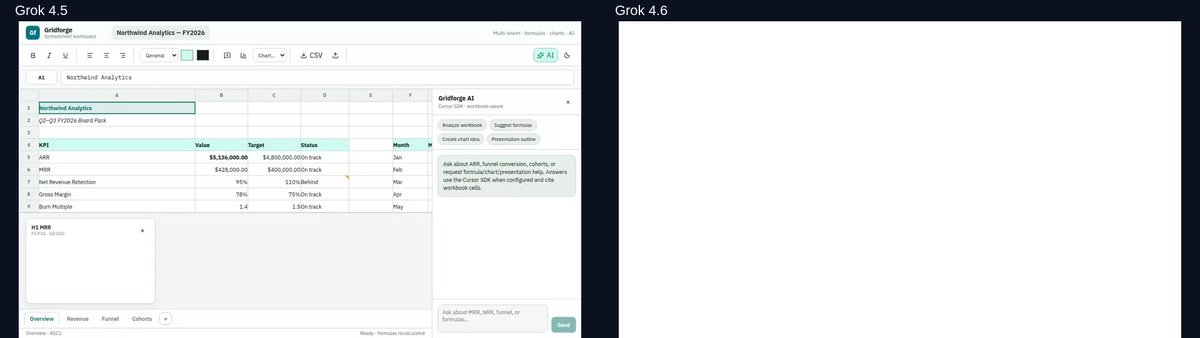
One of the projects I built was a spreadsheet app, and I gave it to both models twice. One run got a two page specification covering every toolbar item, keyboard shortcut, and formula I could think of. The other got three sentences.
The two apps came back nearly identical. What actually changed the result was adding one sentence:
That single line was the highest-leverage thing I found in those weeks! With it, the model opens the app, clicks through real user paths, checks that nested formulas evaluate correctly, and fixes what it finds. None of that works without solid browser use, which is what makes the loop possible at all.
The same principle holds when the output is harder to inspect. "Improve the textures" on a 3D scene got me nowhere, while "capture the current frame, list what's wrong with it, then fix only those things" worked immediately.
Every comparison from here on ran the same prompt through both models in isolated workspaces, so none of it is my memory of last month.
You also don't need to tell it to work hard or keep pushing until it's finished. It will keep going on its own for a good while. What matters far more is saying what done means, because otherwise it decides that for you.
Going further
I played an unreasonable amount of Age of Empires 2 growing up. Thousands of hours. So recreating it was the first project I wanted to try. I asked for a browser strategy game with an economy, construction, combat, fog of war, objectives, and a HUD a new player could read without instructions.
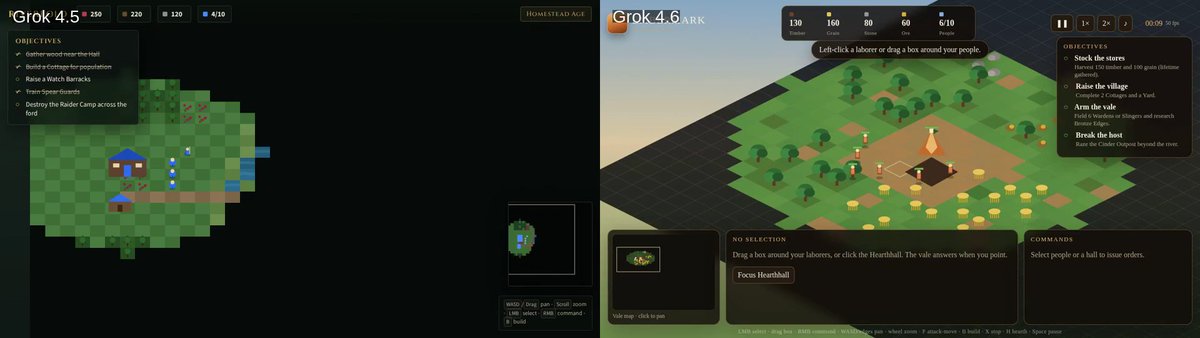
4.5 built a workable flat prototype. 4.6 came back with an isometric 3D world on the first try, HUD and minimap already in place. Much closer to the real thing!
Still on the nostalgia trip, I did MSN Messenger next.
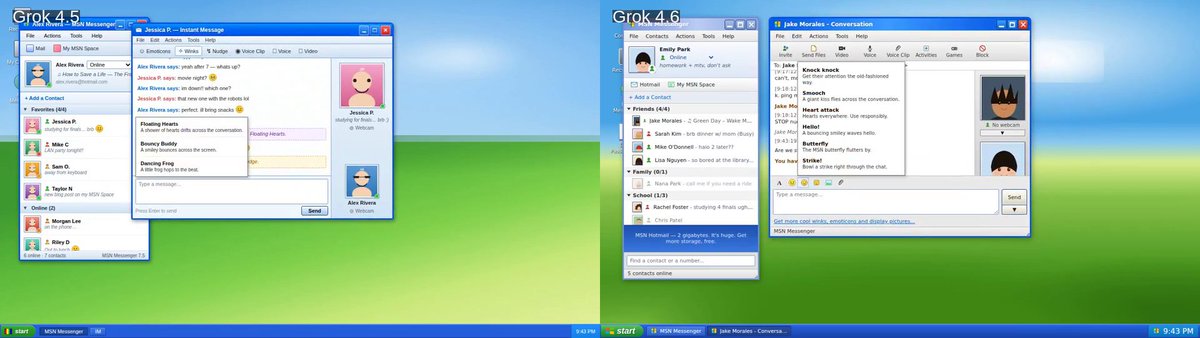
Both models clearly knew the reference and did a good job. 4.6 just has more polish, down to the separate conversation windows and the winks.
I use Excalidraw constantly and it's open source, which made it the obvious place to see how the models handle a real codebase instead of an empty folder. I asked both for a presentation mode: save named views, reorder them, and present them as a guided walkthrough. The prompt was deliberately vague about how to build it.
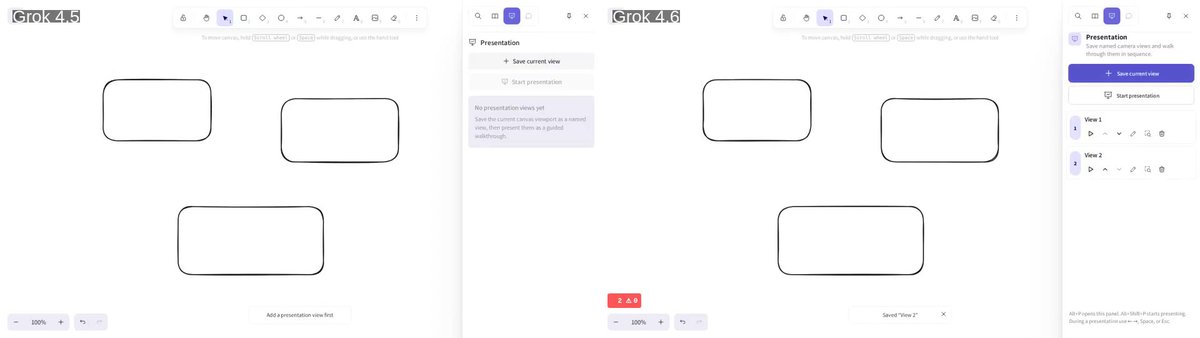
Both land in roughly the same place, which is impressive for a prompt that vague! 4.6 just pays more attention to detail on the first pass, which in practice means fewer rounds of me pointing at things.
This is also where skipping verification bites. On an earlier run the summary read as finished and adding a view didn't actually work. One round of "run it and show me" surfaced the broken import.
Everyday work
I don't put together decks and reports every day, but a lot of people do, and I wanted to see how it handled that kind of work. So I gave both models the same fictional quarterly and asked for a board deck.
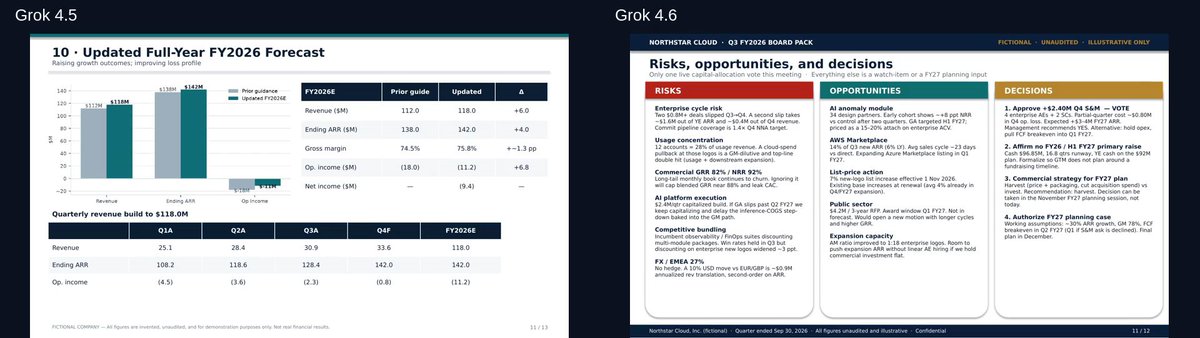
Both are competent, and the gap is in presentation rather than analysis. 4.5 mostly lays the numbers out on slides, while 4.6 puts real work into structure and hierarchy, so it reads like a deck somebody made rather than a data dump.
Video as code
is video as code: every frame is a React component that renders off the current frame number, and the whole thing compiles to an MP4 through headless Chromium and FFmpeg. Your video lives in git. It's a genuinely fun way to work! It's also a strange thing to hand a model, because you can't tell whether it succeeded by checking that it runs.This one deserves more space, because I've been spending a lot of time on it lately.Remotion
to work from.I asked for a 60 to 90 second launch film for the X TypeScript SDK and gave itthe docs
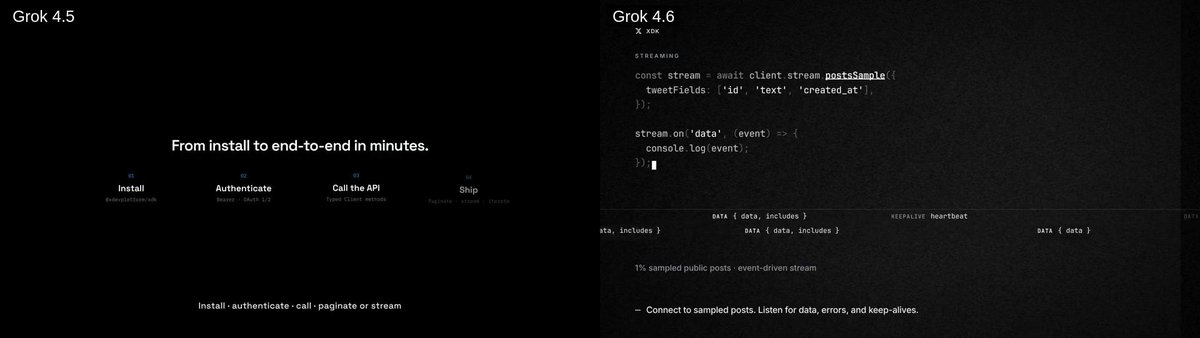
I judge these on whether there's a storyline and whether the pacing holds. Most models fail the same way here, with uppercase titles, boxed text, and everything landing on screen at once. Both films avoid most of that, and 4.6 is the more compelling watch.
After a few days of running this across different models, video is where I see the widest spread. Two models that feel equally capable on a web app can be nowhere near each other here.
Where it needs steering
Almost everything I had to steer came back to one thing: how easily the model can verify its own work.
A website is the easy case. The DOM is text, so it can read the page, take a screenshot, and compare against what it intended. That's why the verification loop works as well as it does on UI work.
3D is harder, because there's a whole dimension you can't inspect by reading. Video is harder still, since time is the extra dimension and checking your work means capturing a sequence of frames and reasoning about the delta between them. Physics has the same shape of problem. The model has a good sense of how the world should behave, but confirming that it did behave that way isn't something one screenshot can answer.
The practical answer is to give it a way to look, or to accept that you're the one checking.
Why it's my default
There's real value in spiky models, the ones that are extraordinary at one particular thing. But most of my work isn't one particular thing. What I want day to day is a model I know well: one where I've built up intuition for how it behaves, where it's reliable enough to hand something over, and where I understand the shortcomings well enough to work around them without thinking about it.
That's exactly what 4.6 has turned into for me. On the coding side it handles interactive and visual work where I'm reacting as it goes, plus long sessions in a real repository. On the knowledge work side it's the inbox, the browser QA, and the click-through tasks with no API behind them. It isn't the best imaginable model at any one of those, but it's good at all of them and I know what to expect.
I still stay involved where the output gets judged on how it looks. Motion, 3D, and final polish want a reference and a screenshot loop rather than a description. And I write the acceptance criteria down instead of trusting a summary that says it's done.
Try it
Grok 4.6 is available now in Cursor, SpaceXAI API on OpenRouter and anywhere else you get your tokens!
Try it out and let me know what you think. We're going to keep improving it, so leave feedback either way, good or bad, since that's what tells us where to push next.
Curious to hear what you end up building with it!
3:46 PM UTC · Aug 12, 2026 · 306K Views
881432.1K2.6K