

Any agent can look brilliant on a one-shot task. Give it a week of real work and it starts to fall apart.
"Long horizon" means the agent keeps going across days and dozens of sessions instead of answering once and forgetting you. The work that needs it looks like a schema migration that runs for three weeks, or an incident passed from one on-call shift to the next.
By @Saboo_Shubham_, @secchi_elia, and @lavinigam
We built one and open-sourced it. Long Horizon is a reference implementation of an agent harness on the Agent Development Kit, Apache 2.0, built to be read and lifted rather than installed.
We ran it on ourselves for weeks before release. In almost every bug we logged in that window, one thing showed up: nothing ever threw an error.
- The prompt cache never kicked in, but the API bill looked totally normal.
- Extracting memories before replying slowed every turn, for a benefit nobody would feel until next week.
- A deploy wiped the tools an agent had spent a session installing, and it started over, reporting progress the whole way.
- A sub-agent timed out, and the parent agent cheerfully reported that the job was done.
- A command bypassed our security guard and hit the cloud metadata server, leaving zero logs because, as far as the guard knew, nothing had gone wrong.
A one-shot agent breaks in front of you and stops. A long-horizon agent breaks quietly, hides the problem, and keeps running.You don't need a massive framework to fix this. You need five design patterns that stop an agent from silently drifting off the rails.
Here is what we learned, and how to apply each one to your own stack.
Pattern 1: Stable prefix
Prefix caching is supposed to be an easy win: keep the front of your prompt identical, and the provider serves it from cache at a fraction of the cost and latency.
We turned it on, and our cache hit rate stayed at 0%.
The problem was our memory preloader. Every turn, it fetched past conversations and injected them right into the system prompt at the top. Because recalled memories change every turn, the prefix hash changed every turn. The cache never formed.
Think of prefix caching like a Docker build: change one line near the top, and every layer below it rebuilds from scratch.
To fix it, we sorted the prompt by how fast each piece changes:
- Frozen (top): System instructions, persona, and tool definitions. Byte-identical across every turn.
- Slow (middle): User profile and active tools.
- Volatile (tail): Step counters, runtime warnings, and recalled memories.
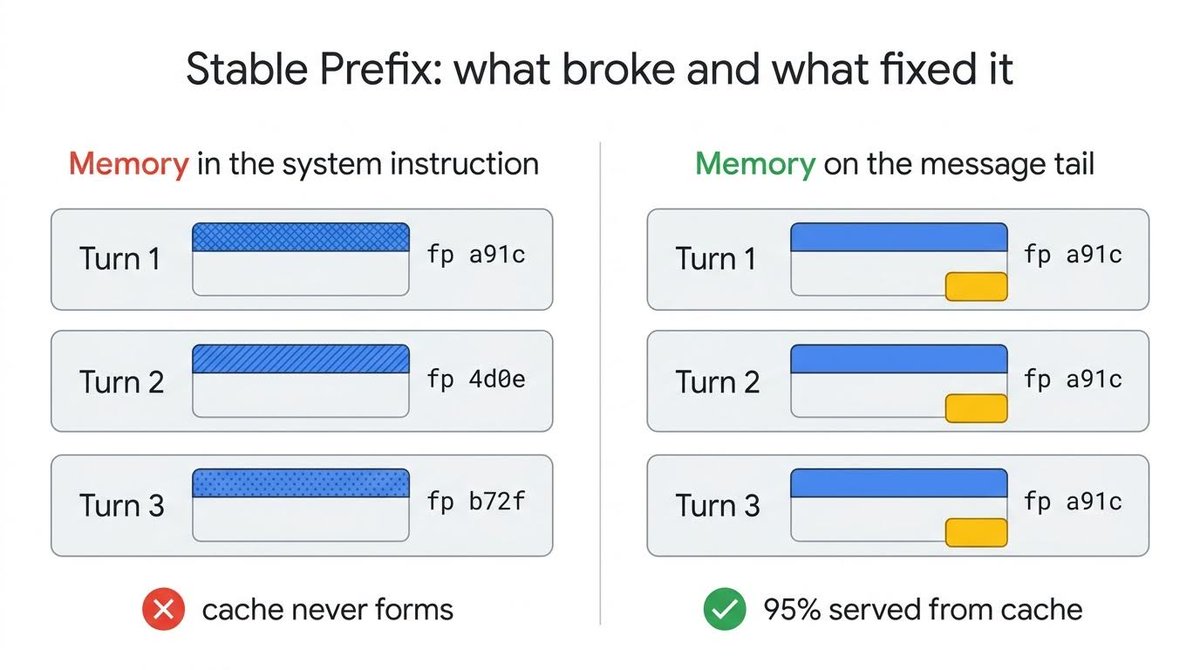
The same text in two positions. In the system prompt it breaks the cache every turn. After the conversation it does not.
Moving dynamic memories to the tail was the entire fix. Turn one warms the cache; every turn after serves 95% of the prompt from it.
Measure it rather than assume. If the cached token count in your response metadata is still zero on turn two, something in your prefix is moving. The same audit took our prompt from 70,000 characters to under 22,000.
Pattern 2: Background learning
An agent that learns over time has to extract memories and write them down.
At first, we did this inline, right before replying. Every turn slowed down to extract memories the user wouldn't need until next week.
The fix is write-behind caching: send the reply to the user first, then run memory extraction in the background under the same user identity so the writes land where the next turn will find them. In ADK, this hooks into the post-response plugin lifecycle.
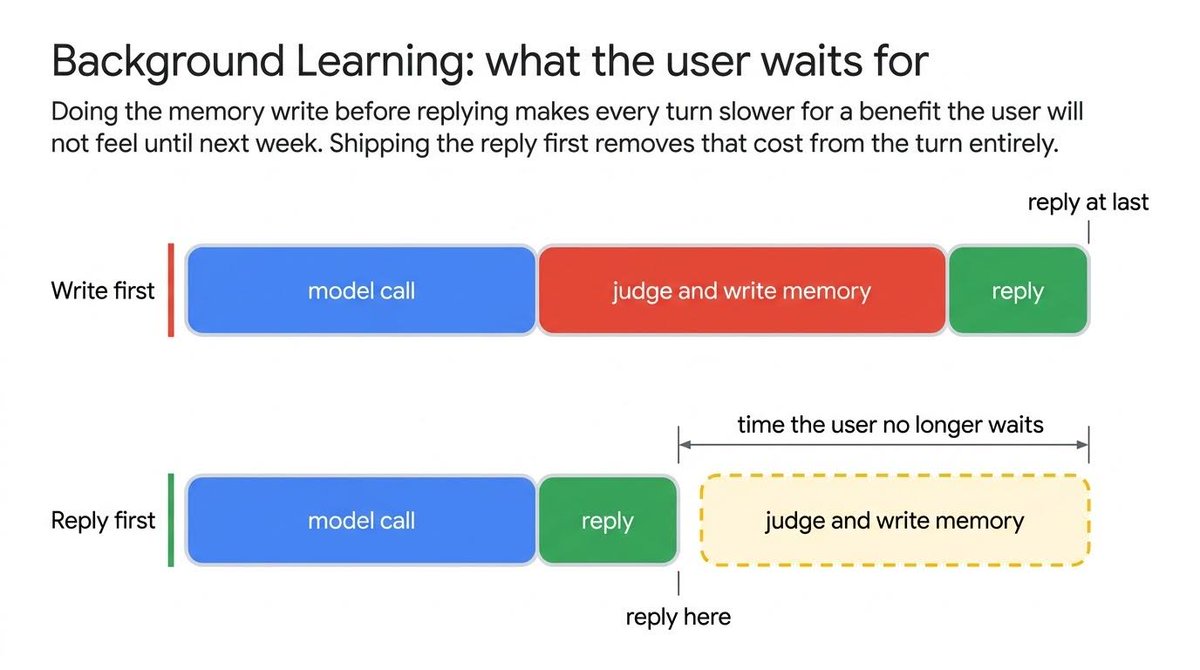
The response returns immediately. The learning runs in a second lane entered only after the user gets their reply.
To make this safe in production, you need three safeguards:
- Hold a strong task reference. In async runtimes like Python's asyncio, an unreferenced background task can get garbage-collected mid-write, silently losing data without throwing an error.
- Use an isolated sibling agent. Give the background learner a minimal tool list, restrict its file writes to the memory directory, and give it no post-response hooks of its own so it cannot accidentally recurse.
- Throttle runs. Wait 120 seconds between background consolidation passes so a burst of quick user messages doesn't trigger dozens of redundant extraction runs.
Finally, keep your shutdown drain timeout lower than the runtime host's timeout. On shutdown, we wait 4 seconds for in-flight writes to complete. If you set this higher than the framework's 5-second cleanup limit, the runtime kills the process mid-write and drops the data anyway.
Pattern 3: Persistent workspace
Hours or days pass between messages from the same user. When the agent wakes back up, everything it built in the meantime has to still be there.
Ours was not. A standard backend deploy wiped the CLI tooling an agent had spent an entire session installing. It carried on regardless, reinstalling everything from scratch and reporting progress the whole way.
Standard web code assumes stateless request handlers. A long-horizon agent is a long-lived process that the same user keeps returning to.
Files, installed tools, and half-finished work must outlive the individual turn. Tool calls should go through an execution interface that owns that state rather than executing against the host directly. The same tool code then runs against a local filesystem in development and a managed sandbox in production without knowing the difference.
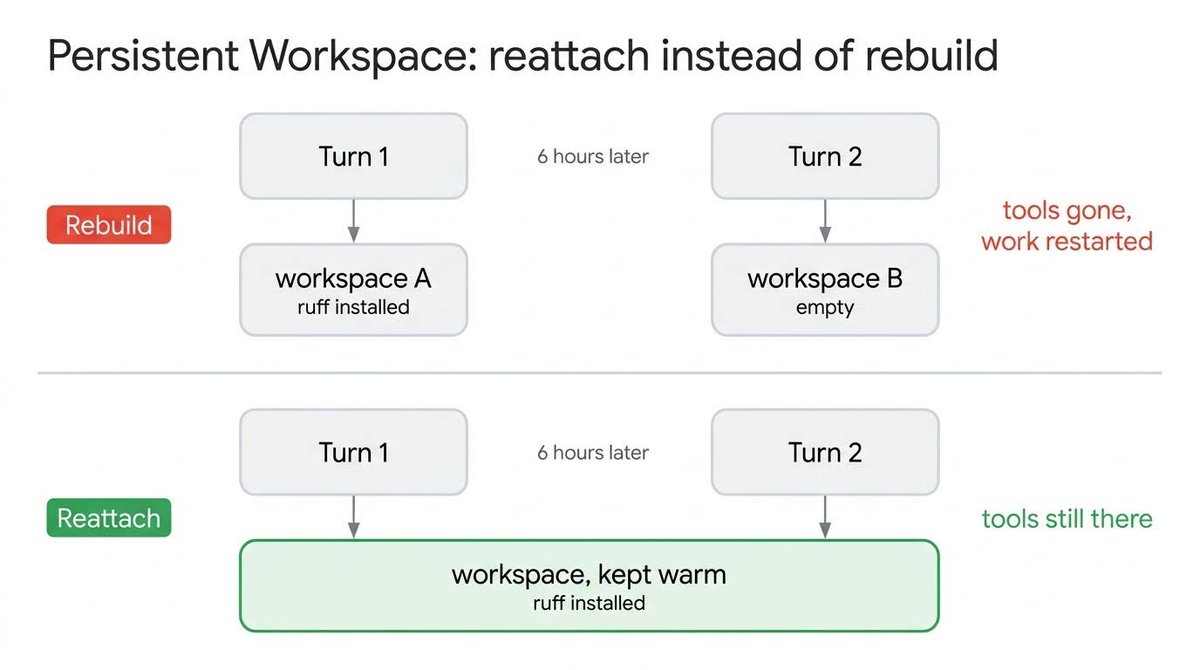
A code executor runs a snippet and forgets it. An environment is the filesystem tomorrow's turn expects to find intact.
Scope it to the user, not the conversation, keep it warm, and let later messages reattach. Keep reattachment version-agnostic so a new backend doesn't wipe yesterday's tools.
And never key liveness on a status code that two lifecycle phases share. A deleted environment returns 502, so we treated any 5xx as dead. A booting one returns 502 too, from its readiness poll, so we evicted healthy environments seconds after creating them.
Pattern 4: Explicit failure
When one agent's output becomes another agent's input, the parent decides whether the child succeeded based on the shape of the return envelope.
An evaluation run caught our root agent reporting "all 20 tests passing" from a delegate call that had actually timed out. Nothing was written. No tests ran.
The envelope invited the hallucination. A child that timed out, hit its step limit, paused for approval, or completed normally all returned the exact same structure, which was every line the child had said while working, joined together. Partial commentary reads exactly like a finished report.
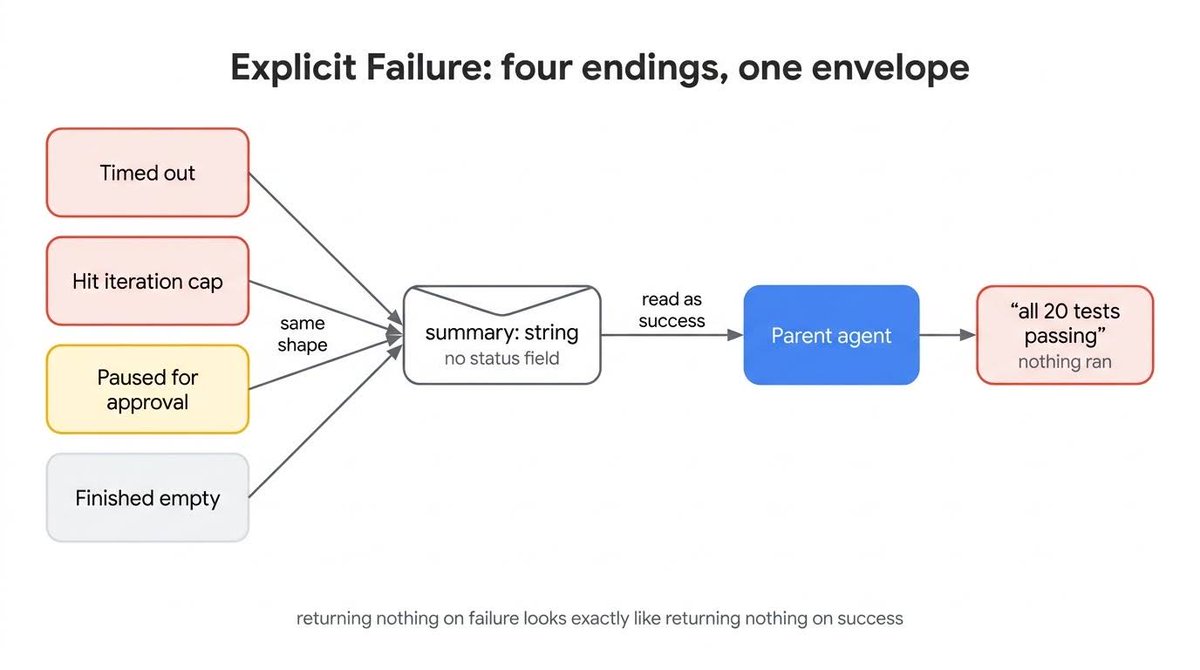
Every ending returned the same kind of string, so the parent had nothing to branch on and read them all as success.
Don't rely on conventions or empty strings. Give every terminal state a name and make the parent branch on it. Ours has four: completed, timeout, halted for a step limit or crash, and pending for a child waiting on a human.
A status field protects the calling code but not the model, which reads the summary, not the field beside it. So rewrite the summary: a child that stopped early returns INCOMPLETE: the child hit the timeout and did not finish. Do not report this work as done.
The companion problem is a loop that runs forever while looking productive. Cap tool calls per iteration (200 for us) and iterations per session (50), then halt at the next clean boundary rather than mid-turn: strip the tools off the request and let the model write a plain-text handoff. Leave the tools attached and it keeps calling them, trading a runaway loop for an error loop.
Pattern 5: Guard chain
An agent with shell access can reach anything the machine can reach, including the cloud provider's metadata endpoint and the credentials it serves.
We blocked 169.254.169.254 by string matching. Then curl http://2852039166/ walked straight past the filter, because that integer resolves to the exact same IP address.
Always normalize before comparing. Never match raw string representations of structured values. That one address has four valid written forms, dotted, integer, hex, and IPv6-mapped, and parsing each candidate into a real address object eliminates all of them at once.
Evaluate guards like a short-circuit expression: run cheap, deterministic checks first, and escalate to expensive ones only when necessary.
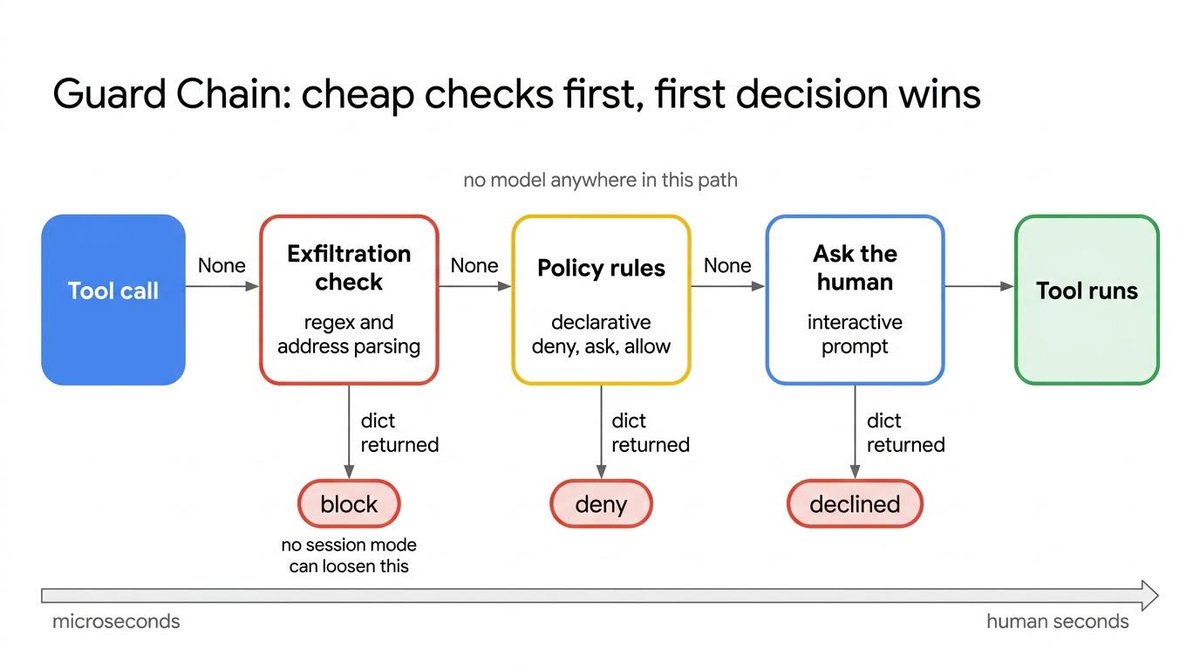
Guards run cheapest first. Returning nothing falls through to the next ; returning a result ends the call.
Our chain uses three stages:
- Exfiltration guard. Blocks dangerous destinations like metadata IP addresses outright. No session setting can loosen this.
- Policy guard. Returns allow, ask, or deny based on declarative rule sets.
- Interactive prompt. Asks the user, last, because a human's attention is the most expensive thing you can spend.
No model sits in this path. It is parsers, declarative rules, and counters: fully auditable, executing in microseconds. That chain became our largest subsystem, with more test code behind it than any other part of the repo.
A guard that asks about everything teaches people to approve without reading. To relax common commands safely, parse the command and resolve the underlying binary rather than substring matching raw text.
Who is around also changes what asking means. In chat it prompts you. In a background sub-agent, with nobody there, it becomes a denial.
Finally, design credentials as if the guards have already been beaten, because eventually they will be. Per-user secrets reach the environment by injection, never the prompt. Sandboxes run from templates with outbound internet disabled at the platform layer. Artifact links arrive as a signed URL for the client and a placeholder for the model, so the credentialed blob never enters a reply.
What to take away
Making an agent survive over weeks isn't about building a massive framework. It's about catching the silent failures before they burn your budget or corrupt your state.
If you audit your own stack this week, start with the simplest check: measure your prefix cache hit rate. If it's sitting near zero, something in your prompt is changing every turn, and your latency graph won't tell you why.
You don't need to adopt the whole harness. Use any pattern you like, read the implementation, and wire it into whatever you're already building:
- Prefix caching and prompt assembly: system_prompt.py and reminders.py
- Background learning worker: sibling_agent_plugin.py
- Persistent workspace interface: environment/base.py
- Typed sub-agent envelopes: delegate_runner.py
- Deterministic guard chain: exfil_guard.py
Explore the Long Horizon harness on GitHub. If you are starting from scratch, get started with ADK in Python, or drive it with agents-cli.
If you liked this article, don’t miss out on our previous article 7 rules for self-improving agent loops every AI engineer should know. And follow along for more.