Every AI agent demo starts with a developer running raw generated code on their laptop, and every production deployment starts with a security team asking what happens when that code turns hostile.
When you hand an LLM access to a terminal, you are giving an unpredictable probabilistic engine the ability to compile binaries, install third-party packages, modify local files, and make outbound network requests. If you run that code on a shared host kernel without isolation, a single kernel exploit or malicious package can compromise your entire infrastructure.
We spent the last few quarters benchmarking, breaking, and running agent sandbox runtimes across Google Cloud and open-source stacks. What we found is that standard cloud infrastructure assumptions fall apart when applied to autonomous agents. Many agents do not behave like microservices with steady HTTP traffic, and they do not behave like batch jobs that execute and exit. They spend 95% of their session waiting on model reasoning or external tools, punctuated by micro-bursts of intense execution.
By Ryan Ismert (@ryan_ismert) and Alan Blount (@zeroasterisk)
Here is what you need to know about the public sandbox landscape, how the isolation primitives actually compare, and how to choose the right execution substrate for your agent:
- Cold-start marketing numbers are measured on empty loops, not real runtimes.
- The isolation spectrum is defined by what code is shared with your neighbor.
- For autonomous agents, network egress is a bigger attack surface than the hypervisor.
- State forking and memory snapshots matter more than raw boot time.
- Use a 4-question decision rubric before picking your sandbox stack.
Disclaimer: this is specifically a review of the most common agent sandbox solutions, there are dozens of other more specialized use cases and solutions. Ask for what you’d wish to see covered in future articles.
1. Cold-start marketing numbers are measured on empty loops, not real runtimes
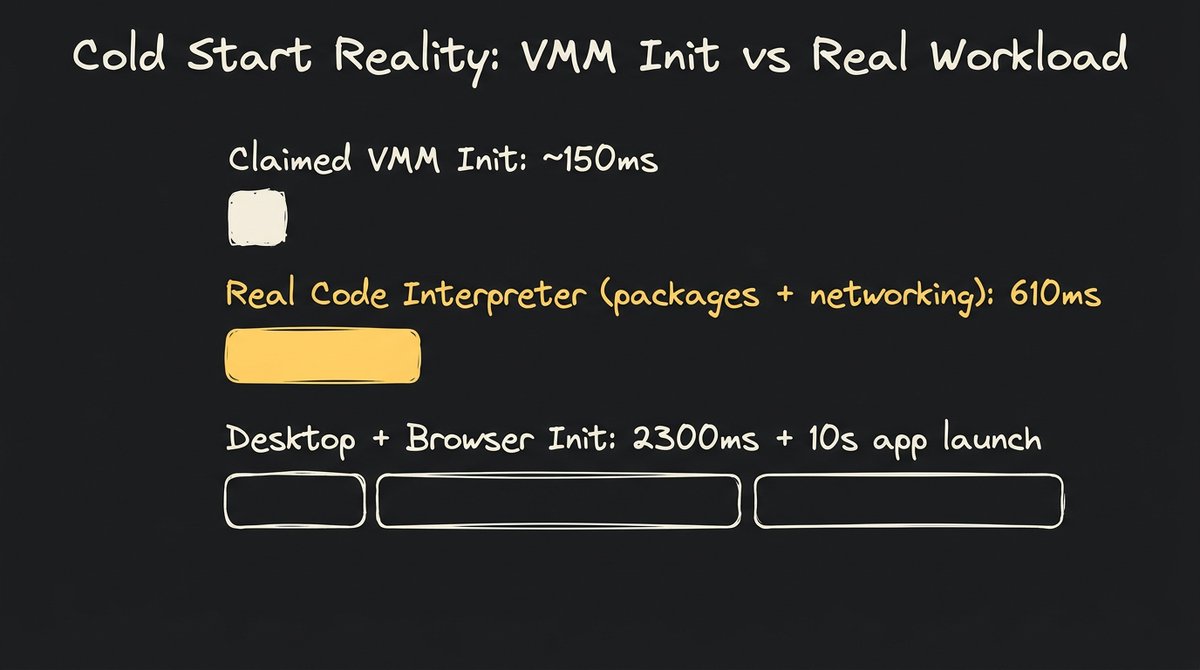
If you have evaluated sandbox providers recently, you have probably seen homepages advertising 100 ms or 150 ms cold-start times. But when you plug that sandbox into your agent loop and execute a real-world script, your first turn suddenly takes three seconds to respond.
The gap comes from what is being measured. A vendor benchmark often measures the time it takes for a minimal Virtual Machine Monitor (VMM) to boot a stripped Linux kernel to an idle command prompt. That is an empty loop. In a real agent workflow, your sandbox has to mount an overlay filesystem, initialize a Python or Node runtime, set up a network interface, and load heavy data science or browser automation libraries.
In our August 2026 testing using e2b_code_interpreter SDK, bootstrapping a standard 2 vCPU / 1 GB sandbox took 610 ms across multiple runs—roughly 4x longer than the bare 150 ms Firecracker VMM init claim. When you step up to an 8 vCPU / 8 GB desktop container, bootstrap latency climbs to 2.3 seconds, and that excludes the ~10 seconds needed for headless Chromium to fully initialize. This cost is paid, even just to load a 3 line JSON endpoint.
To solve this in production, modern agent infrastructure decouples runtime provisioning from invocation. Projects like kubernetes-sigs/agent-sandbox use pre-warmed template pools (SandboxWarmPool), while systems like agent-substrate/substrate multiplex active agent sessions onto warm workers. When pre-warmed pools are managed effectively, steady-state allocation drops to p90 200 ms, keeping interactive agent conversations responsive.
How to use it: Measure real world cold starts and understand the shape of your traffic. Implement pre-warmed worker pools for your most common environment templates, and keep container base images minimal so that initialization overhead does not dominate your latency budget.
2. The isolation spectrum is defined by what code is shared with your neighbor
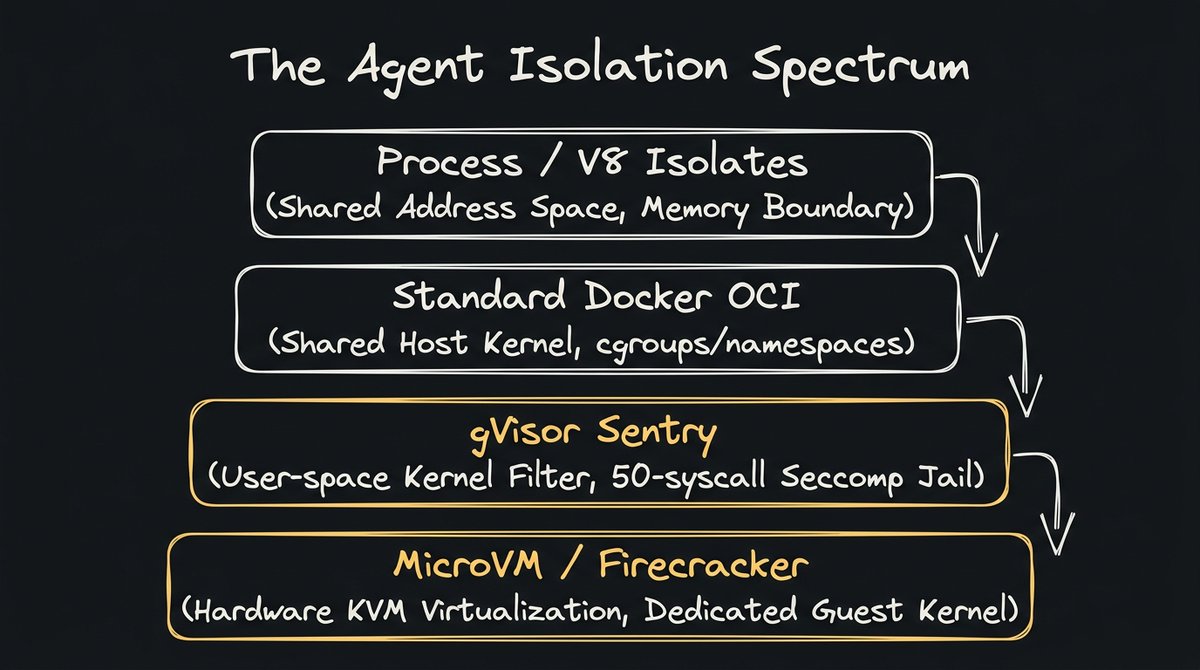
When your security team asks whether running model-generated code in Docker is safe for production, the answer comes down to one technical question: what software layer is shared between the untrusted agent and the underlying host?
Standard OCI containers (like default Docker or Kubernetes Pods) share the host Linux kernel. They rely on cgroups, Linux namespaces, and seccomp profiles to isolate processes. If an untrusted agent runs code that triggers a kernel privilege escalation (such as Dirty Pipe or container escape vulnerabilities like Leaky Vessels), the attacker gains full control of the host node. Kubernetes documentation is explicit on this point: a standard Pod is not a hard multi-tenant boundary.
The isolation landscape breaks into four distinct architectural tiers:
- Process and V8 Isolates (e.g., Cloudflare Workers, Deno Core): Code runs in the same operating system process within isolated memory heaps. Startup latency is ultra-fast (sub-5 ms) and density is massive, but workloads are restricted to JavaScript, TypeScript, or compiled WebAssembly. You cannot run arbitrary Linux binaries or C-extension Python packages.
- Standard OCI Containers (e.g., Docker, runc): Native execution speed and full OS compatibility, but the shared host kernel makes them unsafe for multi-tenant, untrusted LLM code execution.
- User-Space Kernels (e.g., gVisor / runsc): Intercepts application system calls in a Go-based user-space control plane (the Sentry) and filters host access through a strict seccomp jail. It delivers container-level density without exposing the host kernel. While syscall-heavy operations (like fork-heavy build pipelines) carry virtualization overhead, CPU-bound code runs at near-native speeds. There are no publicly recorded Sentry-to-host escape to date.
- MicroVMs (e.g., Firecracker, Cloud Hypervisor, Kata Containers): Runs a dedicated, minimal Linux guest kernel inside a hardware-assisted KVM virtualization boundary. This is the gold standard for hard tenant isolation, though each microVM carries dedicated guest memory overhead.
(Running arbitrary LLM-generated bash commands in standard rootless Docker is basically betting your cluster on the hope that the model never generates a C snippet that hits a zero-day kernel race condition.)
How to use it: If you are running internal developer agents on trusted private code, standard hardened containers are fine. If you are building a platform that executes untrusted code (and all LLM-generated code is untrusted) generated on behalf of multiple users, choose gVisor or microVMs. Never rely on standard namespace isolation as your sole defense. Many layers of additional defense are necessary, like using Model Armor to protect inputs and outputs or even more importantly network egress…
3. For autonomous agents, network egress is a bigger attack surface than the hypervisor
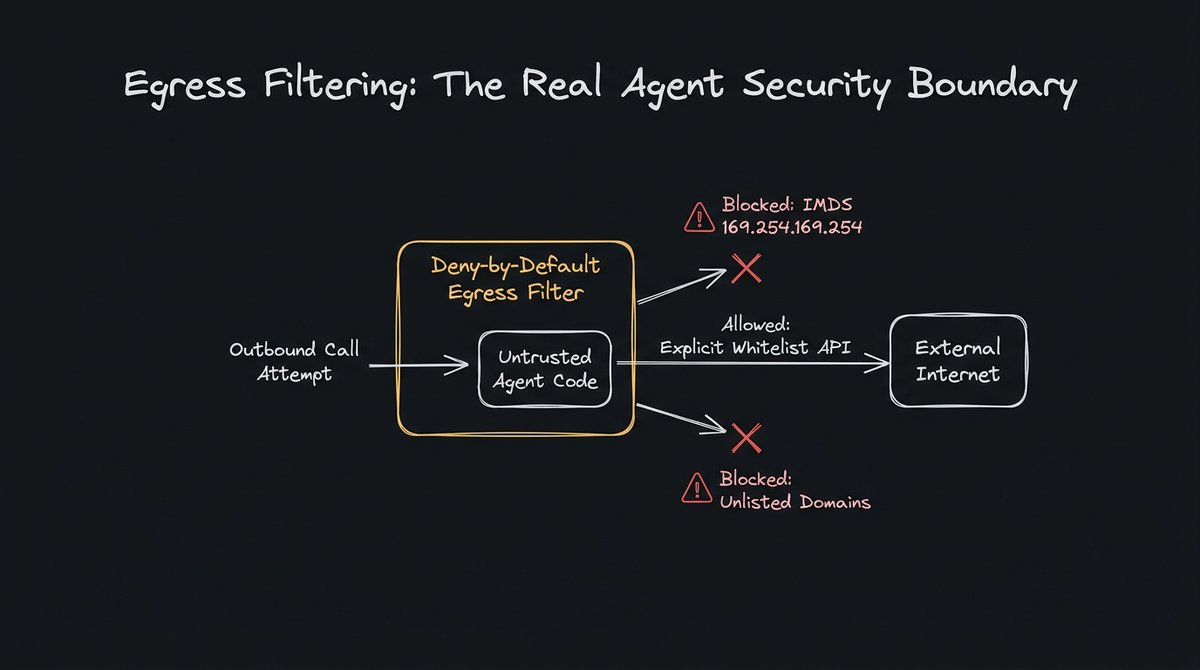
When security engineers evaluate sandboxes, they usually spend 90% of their time auditing hypervisor boundaries and 10% on networking. For AI agents, that priority is backwards.
An attacker who compromises an agent via prompt injection does not need a hypervisor escape. If your sandbox has unrestricted outbound internet access, the agent can exfiltrate sensitive files, query internal cloud metadata services (like 169.254.169.254), or steal ambient IAM credentials using standard HTTP requests with zero exploits.
And in the presence of a hypervisor escape, network controls provide additional defense-in-depth that blocks lateral access to other network resources. As recent exploits by highly capable cyber agents have demonstrated, relying on hypervisor security alone is insufficient to constrain damaging outcomes.
In production agent environments, network egress must be deny-by-default. The sandbox execution environment should block all outbound internet traffic unless an explicit domain or IP allowlist is provided.
Furthermore, ambient environment credentials must be stripped. The sandbox process must not inherit parent environment variables, secret tokens, or access to instance metadata endpoints. If the agent needs to call external APIs, those requests should route through an identity-aware gateway (like Agent Gateway) that enforces token verification outside the sandbox boundary.
How to use it: Apply a default-deny firewall rule to every sandbox network bridge. Explicitly block access to link-local addresses (169.254.0.0/16) and require explicit domain allowlists for any tool call that requires package downloads or external API calls.
4. State forking and memory snapshots matter more than raw boot time
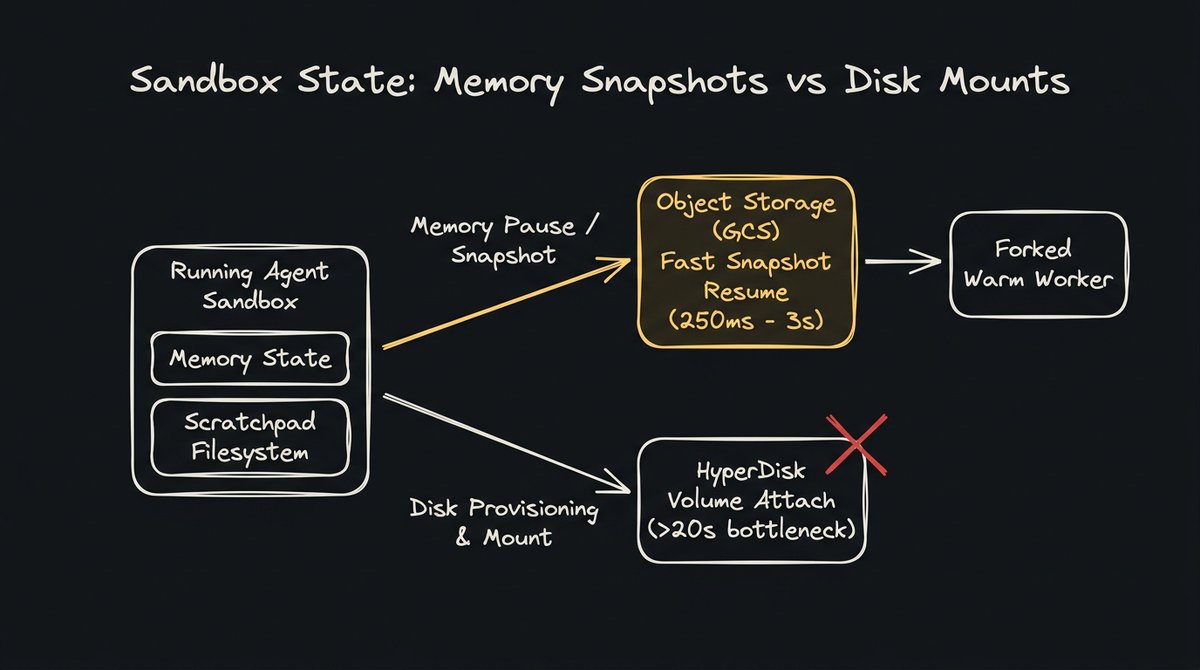
A typical agent session spans multiple interactive turns: inspecting files, running a test, hitting a failure, and editing code. If your sandbox destroys state on every turn, your agent loses its workspace context.
But maintaining state presents an architectural dilemma. Keeping dedicated VMs running continuously bleeds cash during the 95% of the session an agent sits idle. But attaching persistent block disks on demand to fresh instances adds 20+ seconds of mount overhead on every turn.
The modern solution is memory checkpointing to object storage (like Cloud Storage). When an agent goes idle, the runtime pauses memory state and writes an incremental snapshot to object storage. When the next tool call arrives, a warm worker restores the snapshot in 250 ms to 3 seconds, preserving workspace state without burning idle VM budgets.
On an optimized warm multiplexed worker pool, warm per-call execution latency consistently drops to p50 ~50 ms under concurrent load, compared to upwards of 500 ms on unpooled, serialized execution backends.
How to use it: Decouple ephemeral sandbox execution from persistent data. Store durable agent artifacts in cloud object storage and use copy-on-write scratchpads for local filesystem operations during active turns. This should be built into your chosen sandbox service or platform with auditable security guarantees.
5. Use a 4-question decision rubric before picking your sandbox stack
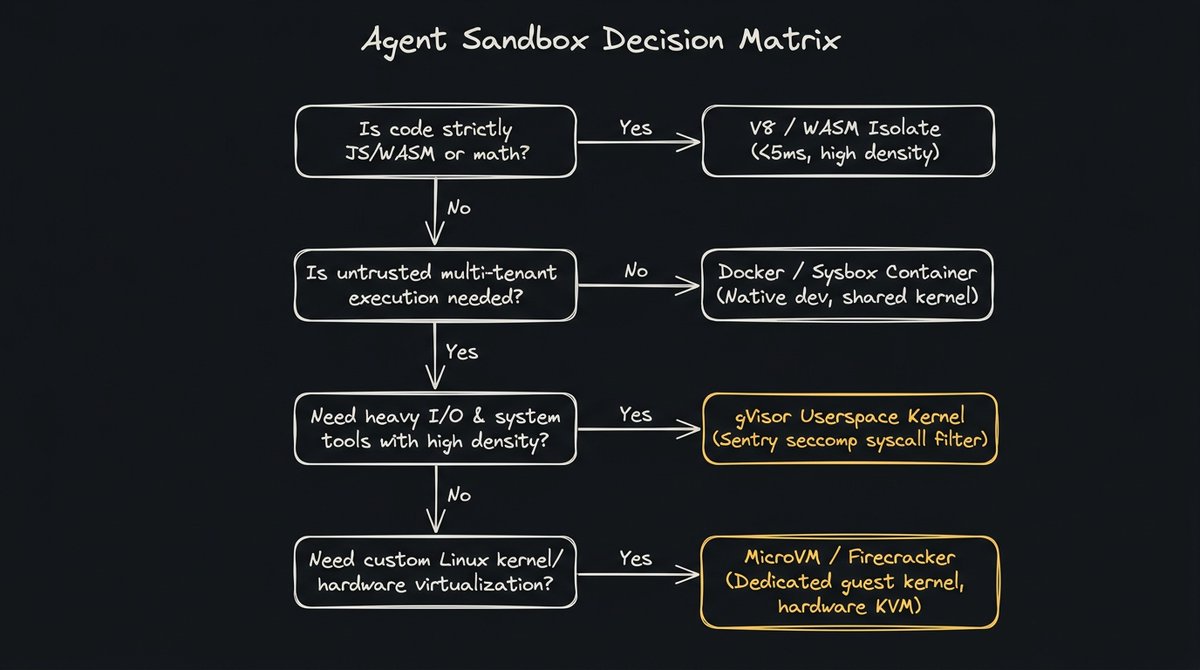
With dozens of runtime options across cloud providers and open-source tooling, choosing the right sandbox comes down to evaluating four technical constraints: language scope, multi-tenancy, I/O profile, and hardware virtualization requirements.
Work through this decision tree before writing infrastructure code:
- Is your workload limited to pure JavaScript, TypeScript, or deterministic math? Choice: V8 Isolates or WebAssembly. You get sub-5 ms startup times, minimal memory overhead, and massive density.
- Are you running single-tenant internal developer workflows with trusted code? Choice: Standard Hardened OCI Containers (Docker / containerd). You get full OS tooling, fast builds, and native performance without hypervisor overhead.
- Do you need high-density, multi-tenant untrusted execution with full Linux userland tools? Choice: User-space Kernels (gVisor / Agent Platform Sandbox / GKE Sandbox / Cloud Run Sandbox). You get strong syscall isolation, low memory tax, and fast resume without maintaining VM hypervisors.
- Do you require custom Linux kernel modules, dedicated guest kernels, or hardware-level isolation? Choice: MicroVMs (Firecracker / Kata Containers / Cloud Hypervisor).
(If anyone tries to convince you that a single sandbox technology is the optimal choice for all four use cases, check if they are selling compute credits.)
How to use it: Start by cataloging the exact commands your agent actually runs. If 90% of your tool calls are standard Python scripts with data analysis libraries, deploy a managed user-space sandbox first. If you need more, it’s worth simulating real end-to-end traffic and benchmarking the total cost of ownership as you secure and scale.
Verify it yourself
Make sure you are comparing apples to other apples and make sure you test the full lifecycle of a real sandbox, not just the hype.
- Quickstart CLI: Use the Agents CLI to create and manage sandboxes from any local agent.
- Fully Managed: Choose Gemini Enterprise Agent Platform for managed sandboxing, egress controls, and sub-second scaling.
- Self-Managed Kubernetes: Use GKE Agent Sandbox for dedicated control over container density and VPC perimeters.
- Open Source Roadmap: Follow Agent Substrate for next-gen agent actor scheduling.
If you found this breakdown useful, check out our previous piece on agent loop resilience and long-horizon harness design. Follow @GoogleCloudTech for more deep dives from the builder trenches.