

Agent Plugins enable developers to package skills, tools and governance into a single sharable package. When packaging local Model Context Protocol (MCP) servers in Agent Plugins for Google Antigravity, developers have a choice on how to expose the MCP tools to the agent model. Eager loading tools register directly as top-level tools and lazy loading tools are exposed on-demand through the proxy tool call_mcp_tool. by James O'Reilly, DevRel @ Google
In this article, you will learn:
- Agent Plugin architecture
- Eager vs. lazy loaded MCP tool trade-offs
- Direct vs. delegated self subagent tool execution
Eager vs. Lazy loading MCP tools
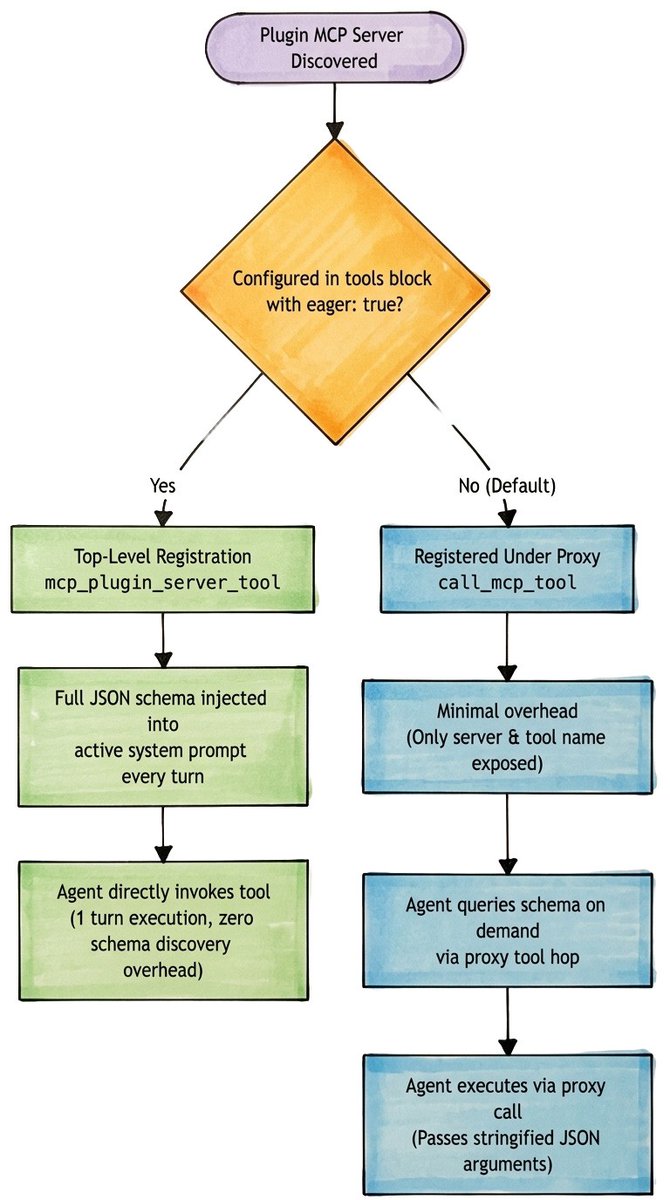
When an agent plugin registers an MCP server, Antigravity inspects the server's tools and decides how to surface them to the model. Plugin defined MCP tools are lazily loaded by default, but can be configured to eagerly load instead.
Eagerly loaded MCP tools
When a tool is explicitly marked with "eager": true in mcp_config.json, Antigravity generates a top-level function following the naming convention mcp_<pluginName>_<serverName>_<toolName>.
The model sees the tool's complete JSON schema in its active system prompt on every turn. When the model decides to call the tool, it does so by calling it by the derived tool name.
Pros/Cons:
- ➕ The tool's JSON schema is loaded directly into the model's top-level function list at startup.
- ➕ The model may directly invoke the tool making it faster than lazy loaded tools because it avoids the discovery turn.
- ➕ Validates parameter types directly.
- ➖ Consumes fixed token overhead in the system prompt on every turn, regardless if the tool is called that turn, resulting in more baseline token usage.
- ➖ If an application registers 100+ eagerly loaded tools it would consume tens of thousands of tokens per prompt and could lead to reasoning degradation (context bankruptcy).
Lazily loaded MCP tools (plugin default)
When a tool is omitted from the tools configuration block or has "eager": false it is lazily loaded.
Since lazily loaded tools are not available as a top-level function, Antigravity provides a generic proxy tool named call_mcp_tool. Tool schemas are stored externally and when the model needs to invoke the tool, it reads the tool schema on demand and invokes the proxy tool with arguments.
Pros/Cons:
- ➕ Just-in-time discovery means the tool does not bloat the context window on initial turns.
- ➕ Allows plugins to expose 100+ specialized tools without exhausting context limits because lazy uses almost no baseline tokens. Only the server name and list of tools are known. Parameters and descriptions do not clutter the prompt until needed.
- ➖ Requires a multi-step proxy hop to call_mcp_tool if the model doesn't yet have the tool schema in its context.
- ➖ Lazy uses more tokens during execution to query the schema file, generate intermediate reasoning, and invoke the proxy tool with arguments.
- ➖ Relies on stringified JSON parameters passing through a proxy tool which has a slightly higher chance than eager loading of having a syntax or quoting error.
Our example Agent Plugin architecture
To demonstrate eager vs. lazy loading, I've built the test plugin, local-mcp-demo-plugin. It follows the standard Agent Plugin directory structure:
In Antigravity 2.0 and IDE, to install the plugin:
- Workspace Level: Place your plugin folder inside a .agents/plugins/ or _agents/plugins/ directory at the root of your opened workspace. This makes the plugin available only when working in this specific workspace.
- Global Level: Place your plugin folder inside ~/.gemini/config/plugins/ in your user home directory. This makes the plugin active across all workspaces.
In Antigravity CLI, to install the plugin globally use the CLI command:
1. MCP declaration (mcp_config.json)
Whether configuring custom servers for Antigravity 2.0, Antigravity IDE, or Antigravity CLI, the configuration file follows a standardized format. The server local-db-server is configured as a local Python server running over standard I/O using JSON-RPC 2.0.
In my MCP config, I set the current working directory (CWD) to the ${PLUGIN_ROOT} variable. This method of assignment means that the MCP tools will run with the plugin folder as the root directory. If your tools need access to the workspace files you can instead omit the cwd param and set "args": ["${PLUGIN_ROOT}/scripts/mcp_server.py"] which will set the cwd to the workspace folder but the MCP tool will lose access to the plugin folder. Consider which is appropriate for you.
The key distinction between the two registered MCP tools:
- get_inventory_eager is declared with "eager": true. The runtime registers it directly as mcp_local-mcp-demo-plugin_local-db-server_get_inventory_eager following the format mcp_<pluginName>_<serverName>_<toolName>.
- get_inventory_lazy is declared with "eager": false. It remains accessible via the call_mcp_tool proxy meta-tool. Note, this is the default behavior and the tool entry could have been omitted from the tools list to the same effect. I've included it here to emphasize clarity between eager and lazy.
2. MCP server (JSON-RPC stdio) (scripts/mcp_server.py)
The server runs over standard I/O using JSON-RPC 2.0. The tools/list response includes both tools:
When either tool is invoked via tools/call, the server returns the same mock inventory:
Refer to scripts/mcp_server.py for the complete implementation.
3. Interactive agent skill (skills/auditing-inventory/SKILL.md)
The plugin includes a skill that uses ask_question to prompt the user to make a selection between four call permutations:
Refer to skills/auditing-inventory/SKILL.md the full skill source code for complete implementation.
4. Lifecycle hooks (hooks.json)
Included in this example, but not explained in this article, are two lifecycle hooks. Handlers are registered for the PreToolUse and PostToolUse lifecycle events to audit the system. If you're curious about how this works refer to hooks.json and scripts/audit_hook.py in the project folder.
Test scenarios
To trigger the tests use the following prompt:
This initiates the plugin's agent skill through skill discovery. The skill instructs the agent to present an interactive modal with 4 choices. Each choice is explained below.
Test 1: Direct eager call
When the user selects "(Recommended) Direct Eager Call":
- The main agent inspects function declarations and finds mcp_local-mcp-demo-plugin_local-db-server_get_inventory_eager.
- Before the tool executes, the runtime triggers PreToolUse and the impending tool call is logged.
- The tool executes directly against the MCP server, returning the inventory records.
- After the tool executes, the runtime triggers PostToolUse and the successful completion is logged.
- The main agent responds with the data in the chat conversation.
Test 2: Direct lazy call
When the user selects "Direct Lazy Call":
- Since the get_inventory_lazy function is not exposed as a native function, the main agent uses the call_mcp_tool proxy tool.
- Before the tool executes, the runtime triggers PreToolUse and the impending tool call is logged.
- The proxy tool executes call_mcp_tool targeting get_inventory_lazy on local-db-server.
- After the tool executes, the runtime triggers PostToolUse and the successful completion is logged.
- The main agent responds with the data in the chat conversation.
Key takeaway: The tool executes successfully without cluttering the model's top-level function declarations.
Test 3: Self subagent with eager call
When the user selects "Spawn 'self' subagent with Eager Call":
- The main agent invokes invoke_subagent with TypeName: "self", Role: "Inventory Auditor (Eager)".
- A background process clone is spawned with its own conversationId.
- The self subagent inherits the parent's environment and discovers mcp_local-mcp-demo-plugin_local-db-server_get_inventory_eager as a native tool.
- The self subagent executes mcp_local-mcp-demo-plugin_local-db-server_get_inventory_eager.
- Before the tool executes, the runtime triggers PreToolUse and the impending tool call is logged.
- The tool executes directly against the MCP server, returning the inventory records.
- After the tool executes, the runtime triggers PostToolUse and the successful completion is logged.
- The self subagent uses send_message to respond to the main agent with inventory data.
- The main agent responds with the data in the chat conversation.
Key takeaway: self subagents inherit eager MCP tools as first-class citizens, and hook governance applies uniformly across parent and child processes.
Test 4: Self subagent with lazy call
When the user selects "Spawn 'self' subagent with Lazy Call":
- The main agent invokes invoke_subagent with TypeName: "self", Role: "Inventory Auditor (Lazy)".
- A background process clone is spawned with its own conversationId.
- The self subagent inherits the call_mcp_tool proxy meta-tool.
- The self subagent executes call_mcp_tool targeting get_inventory_lazy on local-db-server.
- Before the tool executes, the runtime triggers PreToolUse and the impending tool call is logged.
- The tool executes directly against the MCP server, returning the inventory records.
- After the tool executes, the runtime triggers PostToolUse and the successful completion is logged.
- The self subagent uses send_message to respond to the main agent with inventory data.
- The main agent responds with the data in the chat conversation.
Key Takeaway: Background subagents can seamlessly execute lazy MCP tools without needing prior tool registration.
Conclusion
Agent plugins provide a modular, product-ready standard for extending AI agents with specialized capabilities. By balancing eager loading for core tools and lazy loading for remaining tools, you can optimize context window efficiency without sacrificing execution speed.
Additional resources
- Demo Source Code: Github repo
- Documentation: Agent Plugins
- Documentation: Model Context Protocol (MCP)
- Documentation: Agent Skills
- Documentation: Hooks