

Bruno Volpato
@brunovolpato
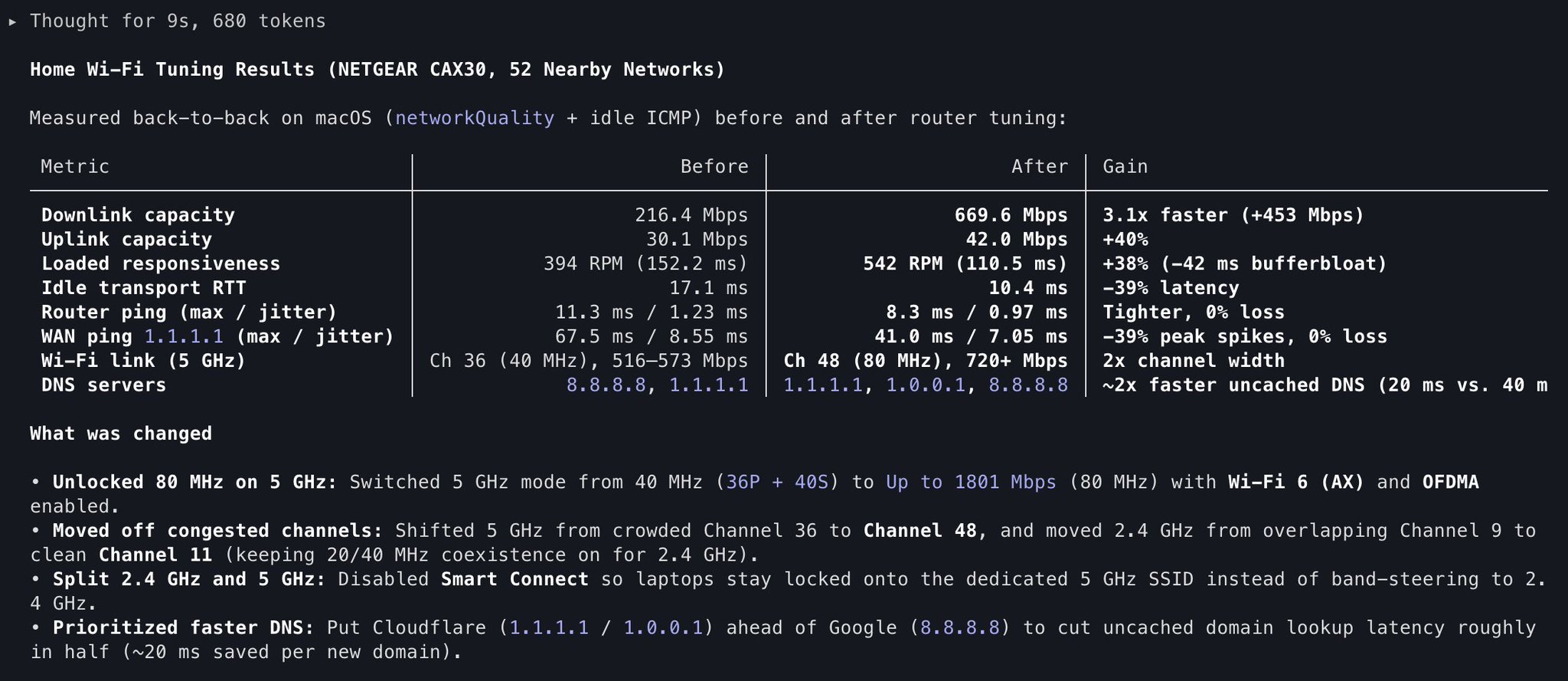
Go ahead and point Neon / Claude / Codex look at your Wi-Fi to optimize it, I just tried and it 🤯 Posting a full prompt in the 🧵
3:26 AM UTC · Nov 23, 2026 · 689.3K Views
1402156.5K12.3K

Bruno Volpato
@brunovolpato
Full prompt
----
Diagnose my Wi-Fi and home network, identify the real bottlenecks behind slow speeds or instability, and guide me through fixing them.
Run these checks sequentially (do NOT run ping in parallel with throughput tests, so idle latency isn't polluted by load):
1. Wi-Fi link & RF congestion:
- Inspect my active Wi-Fi PHY mode (802.11ac/ax/be), band (2.4 / 5 / 6 GHz), channel, channel width (20 / 40 / 80 / 160 MHz), signal/noise (SNR), transmit rate / MCS, and interface packet errors.
- Scan nearby Wi-Fi networks and count competing APs per channel/band to find the cleanest channels in my environment.
2. Hop-by-hop latency & stability (while idle):
- Ping my default gateway (30 packets) and `1.1.1.1` (30 packets, plus IPv6 if active), and run a 5-hop traceroute to separate Wi-Fi/LAN jitter from ISP latency.
- Check for active local bandwidth hogs, VPNs, proxies, or recent Wi-Fi disconnect/roam events.
3. DNS latency:
- Check my current DNS servers and compare uncached lookup latency against `1.1.1.1`, `8.8.8.8`, and my router.
4. Throughput & bufferbloat under load:
- Run macOS `networkQuality -v` (or equivalent on Linux/Windows) to measure downlink, uplink, idle latency, loaded latency / responsiveness (RPM), and ECN/L4S status.
Then give me:
- A concise baseline summary with the exact measurements.
- The top real bottlenecks ranked by impact (skip placebo OS tweaks).
- Safe local quick wins (e.g., faster DNS order) vs. router/modem fixes:
- Unlocking 80/160 MHz width on 5/6 GHz, enabling Wi-Fi 6/OFDMA/WMM, and disabling band steering / Smart Connect if it degrades stability.
- Exact cleanest 5 GHz and 2.4 GHz (1/6/11 only) channels based on my local RF scan.
- Disabling unused guest SSIDs and checking cable/ISP modem signal health (power, SNR, uncorrectable errors) or SQM for bufferbloat.
- Ask for my router model (or a paste/screenshot of its Wireless Settings page) so you can give exact click-by-click settings.
After I apply the changes, re-run the exact same sequential benchmark and output a Before vs. After comparison table.
3:26 AM UTC · Nov 23, 2026 · 118.6K Views
33791.9K6.7K